Sample - Monkey Job
The following is a sample Python code for calling QDC public APIs to test apk app.
- Available chipsets
Monkey jobs can only be used with job targets where the ChipsetCategory is Mobile. To get the list of available targets, call this QDC public API.
- Artifacts limitation
| Type | Artifacts Number | Suffix |
|---|---|---|
| test package | required | .apk/.zip |
| test script | N/A |
A sample Python code to test an apk app
The following steps demonstrate the complete process of creating a new automated monkey job, including:
-
Preparing the parameters and submitting the job
-
Polling the job status
-
Polling the logs once the job is complete
-
Downloading all the logs
Step 1: Create a new python file
-
Create a file named hello_qdc.py
-
Copy and paste the following sample code into hello_qdc.py
import os
import time
import logging

from qdc_public_api_client.logging import configure_logging
from qdc_public_api_client.models import JobType, JobMode, TestFramework, ArtifactType

from qdc_public_api_client.api import qdc_api

if __name__ == '__main__':
    configure_logging(
        level=logging.INFO,
        handlers=[
            logging.StreamHandler(), # logs to console
            logging.FileHandler("./qdc.log") # logs to file
        ])

    # Auth
    api_key = "" # copy from user settings
    appname = "appname"
    on_behalf_of = "user_name"

    public_api_client = qdc_api.get_public_api_client_using_api_key(api_key_header=api_key,
                                                                    app_name_header=appname,
                                                                    on_behalf_of_header=on_behalf_of,
                                                                    client_type_header="Python")

    # Section (1): preparing the parameters and submitting the job
    job_device_target = "SM8750" # device target chipset
    test_package_file = r"./MonkeyExample.apk"  # same name as the apk prepared

    test_package_response = qdc_api.upload_file(public_api_client, test_package_file, ArtifactType.TESTPACKAGE)
    job_target_id = qdc_api.get_target_id(public_api_client, job_device_target)


    job_id = qdc_api.submit_job(public_api_client=public_api_client,
                                target_id=job_target_id,
                                job_name="Example Job",
                                external_job_id="ExJobId001",
                                job_type=JobType.AUTOMATED,
                                job_mode=JobMode.APPLICATION,
                                timeout=600,
                                test_framework=TestFramework.MONKEY,
                                entry_script="",
                                job_artifacts=[test_package_response],
                                monkey_events=500,
                                monkey_session_timeout=100,
                                job_parameters=[])

    # Section (2): polling the job status
    job_completed = False
    checked = 0
    wait_time_seconds = 15
    while not job_completed:
        poll_job_status = qdc_api.get_job_status(public_api_client, job_id)
        if poll_job_status.lower() == "completed":
            job_completed = True
            print("Job is completed, exiting client...")
            break
        elif poll_job_status.lower() == "canceled":
            job_completed = True
            print("Job is canceled, exiting client...")
            break
        else:
            print(f"Job is in {poll_job_status.lower()} mode, waiting for {wait_time_seconds} seconds.")
            time.sleep(wait_time_seconds)
            checked = checked + 1
            if checked == 20:  # After polling 20 times aborting the job
                abort_job = qdc_api.abort_job(public_api_client, job_id)  # To abort the submitted jobs
                print(f"Job state {abort_job}")

    # Section (3): polling the logs once the job is completed
    logs_upload_completed = False
    while job_completed and (not logs_upload_completed):
        log_upload_status = qdc_api.get_job_log_upload_status(public_api_client, job_id).lower()
        logs_upload_completed = log_upload_status in {"completed", "nologs", "failed"}
        if not logs_upload_completed:
            print(f"Job is completed and the server is uploading logs, waiting for {wait_time_seconds} seconds.")
            time.sleep(wait_time_seconds)

    get_job_log_files_response = qdc_api.get_job_log_files(public_api_client, job_id)
    print(f"Job {job_id} logs: {get_job_log_files_response}")

    # Section (4): downloading all the logs
    if get_job_log_files_response:
        for job_log in get_job_log_files_response:
            target_path = f"./logs/{job_log.filename}.zip"
            target_dir = os.path.dirname(target_path)
            os.makedirs(target_dir, exist_ok=True)
            qdc_api.download_job_log_files(public_api_client, job_log.filename, target_path)
Step 2: Prepare test package
Prepare an apk file and move it into the same folder as hello_qdc.py. This apk file will be uploaded to remote device during the test.
Step 3: Execute and check the Logs
- Run the following command.
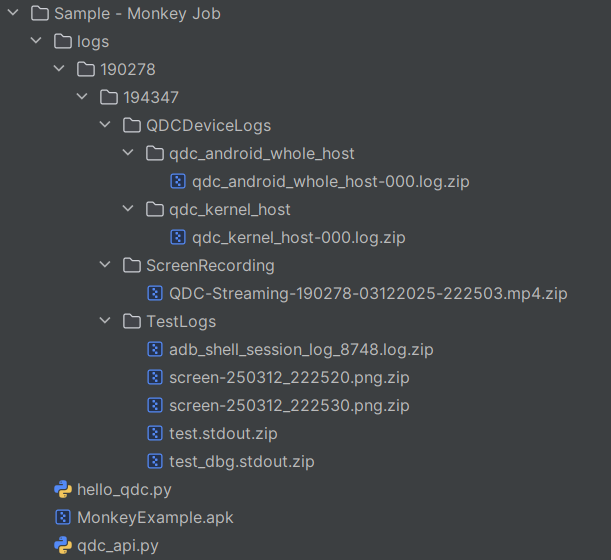
python hello_qdc.py- After successful execution, the job logs will be saved in the current folder.